
Are Coupon Extensions Safe? What Their Permissions Actually Allow
Installing one means granting access to every site you shop on. Here's what that permission literally allows, what it doesn't, and how to check what an extension is doing with it.

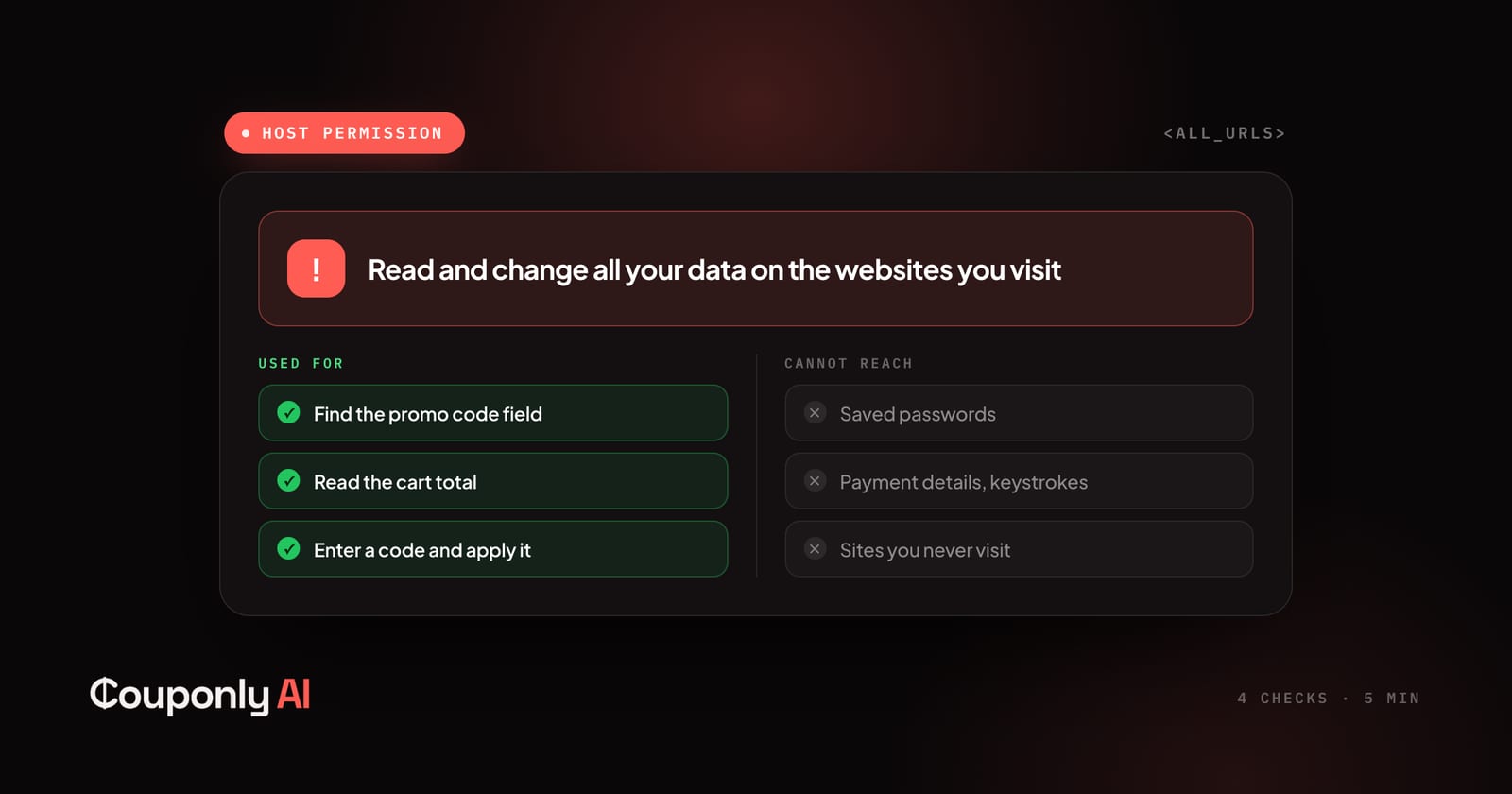
Before Chrome installs a coupon extension, it shows you a warning: Read and change all your data on the websites you visit. That is the broadest permission the browser grants, and it is genuinely alarming if you stop to think about it.
Short answer: the permission is real and coupon extensions do need most of it — an extension can't find the discount box on a checkout page it isn't allowed to read. The permission tells you what an extension can do, never what it does. Safety is therefore not a property of the category. It's a property of the specific tool, and it is checkable.
Here's what the warning actually covers, what it doesn't, and the four checks that take about five minutes.
What "read and change all your data" really grants
In technical terms, this is a host permission — usually declared as <all_urls> or a long list of store domains. It lets the extension inject code into the pages you visit and read what's on them.
For a coupon tool, that capability is doing specific work:
Recognising that the page you're on is a checkout page at all
Finding the promo code field, which is named differently on every store
Reading your cart total so it can tell whether a code actually reduced it
Entering a code and clicking apply
None of that is possible from outside the page. An extension restricted to its own popup window would be a manual coupon list with extra steps.
But the same permission, in principle, also allows reading anything else rendered on those pages. That's the honest tension, and no coupon extension can engineer its way out of it. What separates tools is what they do with the access, and whether they've limited themselves in ways you can verify.
What the permission does not cover
Worth being precise, because the fear here often outruns the mechanics:
Your saved passwords. Those live in the browser's credential store, which extensions cannot read.
Other browser profiles, other browsers, or anything outside the browser. An extension is sandboxed to the browser it's installed in.
HTTPS in transit. Extensions read the rendered page, not your encrypted connection to the store.
Sites you never visit. Host permission is exercised page by page. An extension that never runs on a page never sees it.
And under Manifest V3 — the extension platform Chrome now requires — extensions can't fetch and run arbitrary remote code the way they once could. The code shipped through the store is broadly the code that runs.
The gap the 2025 policy change was meant to close
Permissions describe capability. For years, nothing in the store described conduct. An extension could truthfully declare the permissions it needed and quietly do something else with them.
Google closed part of that gap in March 2025 with an updated Affiliate Ads Policy for the Chrome Web Store, enforced from 10 June 2025. Under it, an extension may only add, modify, or replace affiliate links when all three of these hold:
The affiliate programme is disclosed — in the store listing, in the extension's interface, and before installation.
A deliberate user action comes first. No applying codes or cookies silently in the background.
There's a real benefit at that moment — a discount, cashback, or a genuine offer.
Google's own example is unusually direct: a coupon extension must not insert an affiliate link when no coupon or discount was found. The policy arrived shortly after the Honey attribution allegations became public, and violations can get an extension removed from the store.
This matters for your safety assessment because it gives you something concrete to check. Any coupon extension installed today should be disclosing its affiliate programme in its store listing. If it isn't, that's not a nuance — it's a policy violation you can see from the outside. We wrote about how that money actually moves in how coupon extensions make money.
Four checks, about five minutes
1. Read the permissions on the store listing before installing.
Look for the "Privacy practices" tab in the Chrome Web Store. Developers must declare what data they collect and certify it isn't sold or used for unrelated purposes. Compare that declaration against what the extension plausibly needs. A coupon tool requesting access to your browsing history, or declaring collection of "personally identifiable information" and "financial and payment information," is asking for more than the job requires.
2. Find the affiliate disclosure.
Per the June 2025 rule it has to be there — store listing, interface, and pre-install. If you can't find any statement about how the extension makes money, you've learned two things: how it earns is hidden, and it's out of compliance with the store's own policy.
3. Check whether anything happens without you clicking.
Install it, go to a store, and watch. Does it apply codes only when you ask, or does it do things on its own? Silent background activity on shopping sites is exactly what the policy targets. There should be a moment where you press something.
4. Look for real off switches.
Optional data collection — price history, analytics, crash reports — should be individually toggleable, and turning something off should stop it immediately, not "on next sync." A settings page with no switches means every behaviour is mandatory.
Two further signals worth a glance: user count and review history (a large install base means more eyes on behaviour, though it guarantees nothing — Honey had tens of millions), and whether a real, identifiable company stands behind it. On our side, the operating company's registry details are in our Terms and there's a monitored address on the contact page.
What we chose not to build
We can't prove a negative to you in a blog post, so instead here are the specific constraints we designed in, each of which costs us something:
No payment details, no keystrokes, no form contents. The extension doesn't read what you type. That rules out some conveniences we could otherwise offer.
No raw page content. It reads catalogue facts from product pages — price, availability, identifiers — and discards the rest rather than shipping page text back for later analysis.
No browsing history. It doesn't build a record of where you go. It reacts to the page you're on.
One destination. Everything collected goes to couponly.ai. The background process refuses to send collected data anywhere else, so there's no analytics vendor or data broker in the path.
Real toggles. Product-data sharing, price-history lookups, and crash reports each switch off independently and immediately.
No forced account. Testing codes works fully signed out. Price watches are the only feature that needs sign-in, because they have to reach you by email.
The binding version of all of this is in our Privacy Policy, written against what the code does rather than as a generic template, and the feature-level summary is on the extension page. How verification and ranking work is on why you can trust Couponly.
So — are they safe?
The category isn't safe or unsafe. A coupon extension needs broad page access to do its job at all, which means the question can never be "does it have scary permissions?" It will. The question is whether the tool has told you what it does with them, whether that disclosure is specific enough to be falsifiable, and whether the behaviour you observe matches.
That's a higher bar than most extensions clear, and it's a fair one to hold us to. If something we do doesn't match what we've published, tell us — that's a bug on our side, not a misunderstanding on yours.
Frequently asked questions
Are coupon extensions safe to install?
It depends on the specific extension, not the category. Any coupon tool needs permission to read and change data on the sites you shop on — that's how it finds the code field. What varies is what it does with that access, whether it discloses its affiliate programme as the Chrome Web Store has required since June 2025, and whether optional data collection can actually be switched off.
Can a coupon extension see my credit card details?
It has the technical capability to read what's rendered on a checkout page, which is why what an extension commits to matters. Couponly's extension doesn't read payment details, keystrokes, or form contents at all. Saved passwords are separate — those live in the browser's credential store, which extensions cannot access.
Why do coupon extensions need access to all websites?
Because promo code fields are built differently on every store, and an extension can't find one on a page it isn't allowed to read. The permission is granted broadly but exercised page by page — an extension that never runs on a site never sees it.
Do coupon extensions track my browsing history?
Some do; it isn't required for the core function. Couponly's extension doesn't collect browsing history. Check the Privacy practices tab on any extension's Chrome Web Store listing, where developers must declare what they collect.
What did Google change about coupon extensions in 2025?
In March 2025 Google updated its Chrome Web Store Affiliate Ads Policy, enforced from 10 June 2025. Extensions may only add or replace affiliate links when the programme is disclosed in the listing, interface, and before installation; when the user takes a deliberate action first; and when there's a real benefit at that moment. An extension that finds no coupon must not insert an affiliate link anyway.
How can I see what an extension is doing?
Open chrome://extensions, click Details on the extension, and review its site access and permissions. You can restrict many extensions to specific sites, or set them to run only when clicked. The Chrome Web Store listing's Privacy practices tab shows the developer's declared data collection.
Keep reading
The Discounts That Never Get Listed
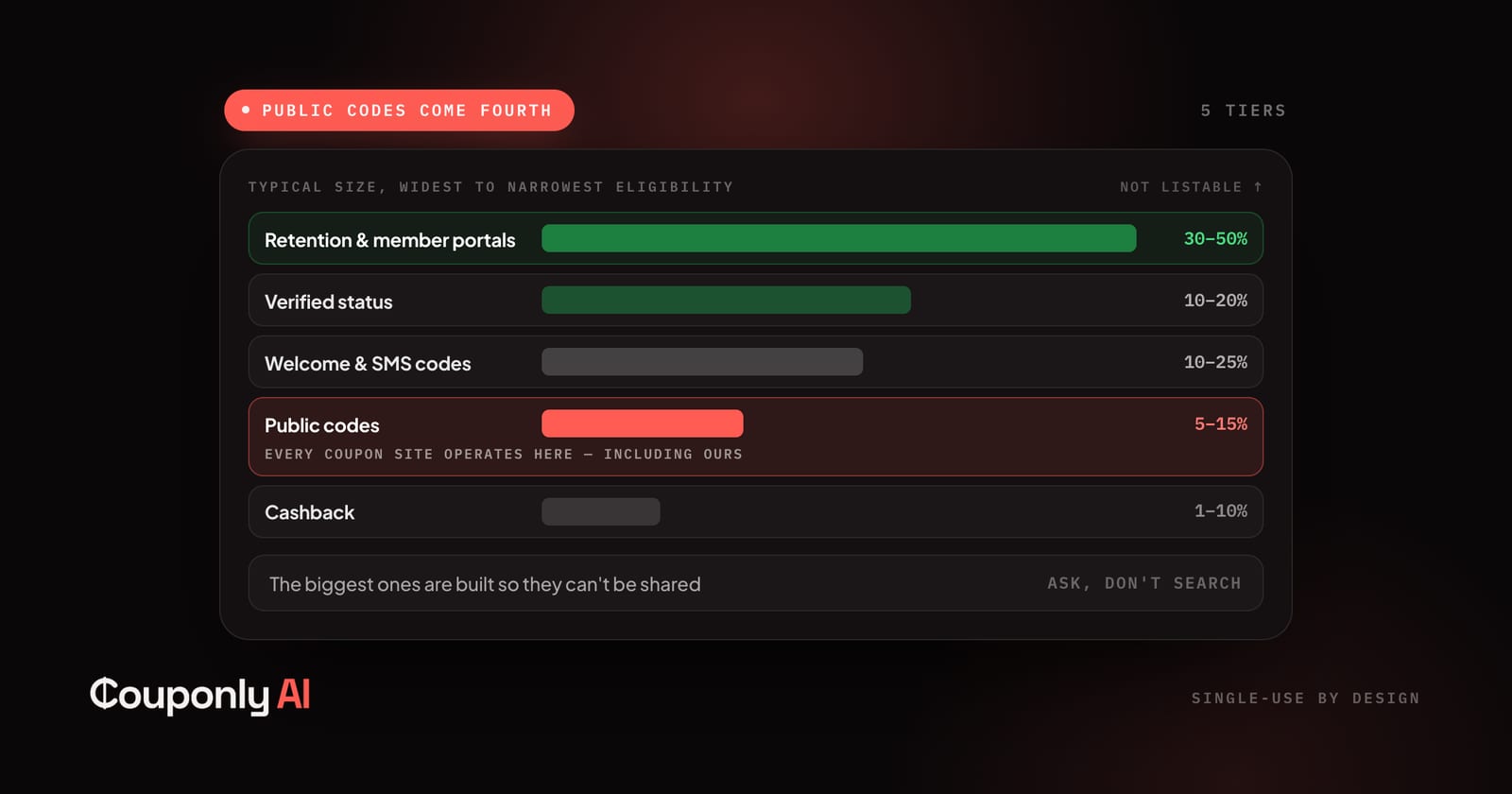
The largest discounts merchants issue never reach a coupon site, because they're built so they can't be shared. Here are nine, and how to get each.
Couponly Editorial
What Creators Should Know About Attribution
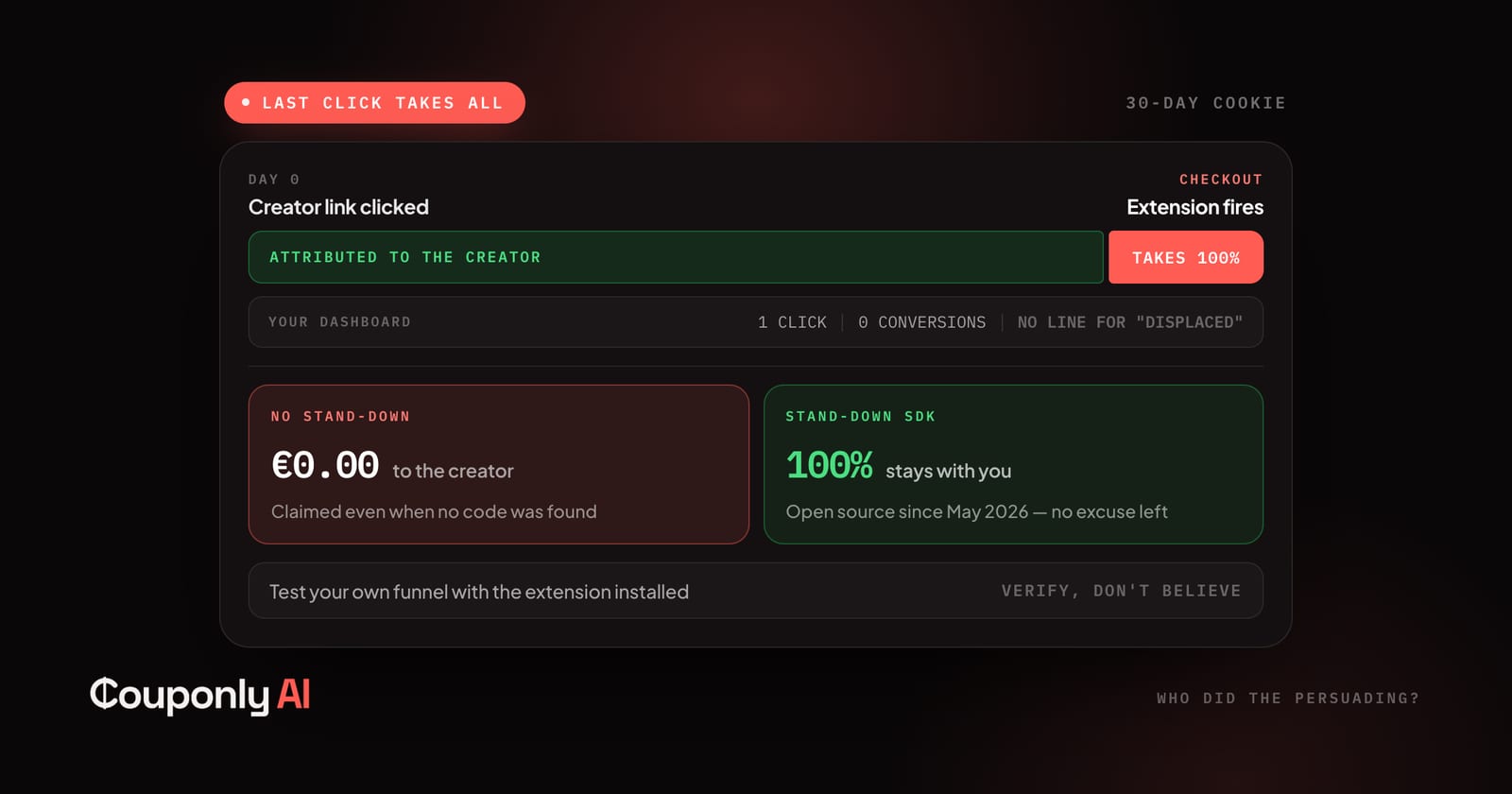
You sent the customer. Someone else got paid. Here's the mechanism, what the 2026 enforcement changed, and what to check on your own links.
Couponly Editorial
The Discount Calendar: When Things Go on Sale
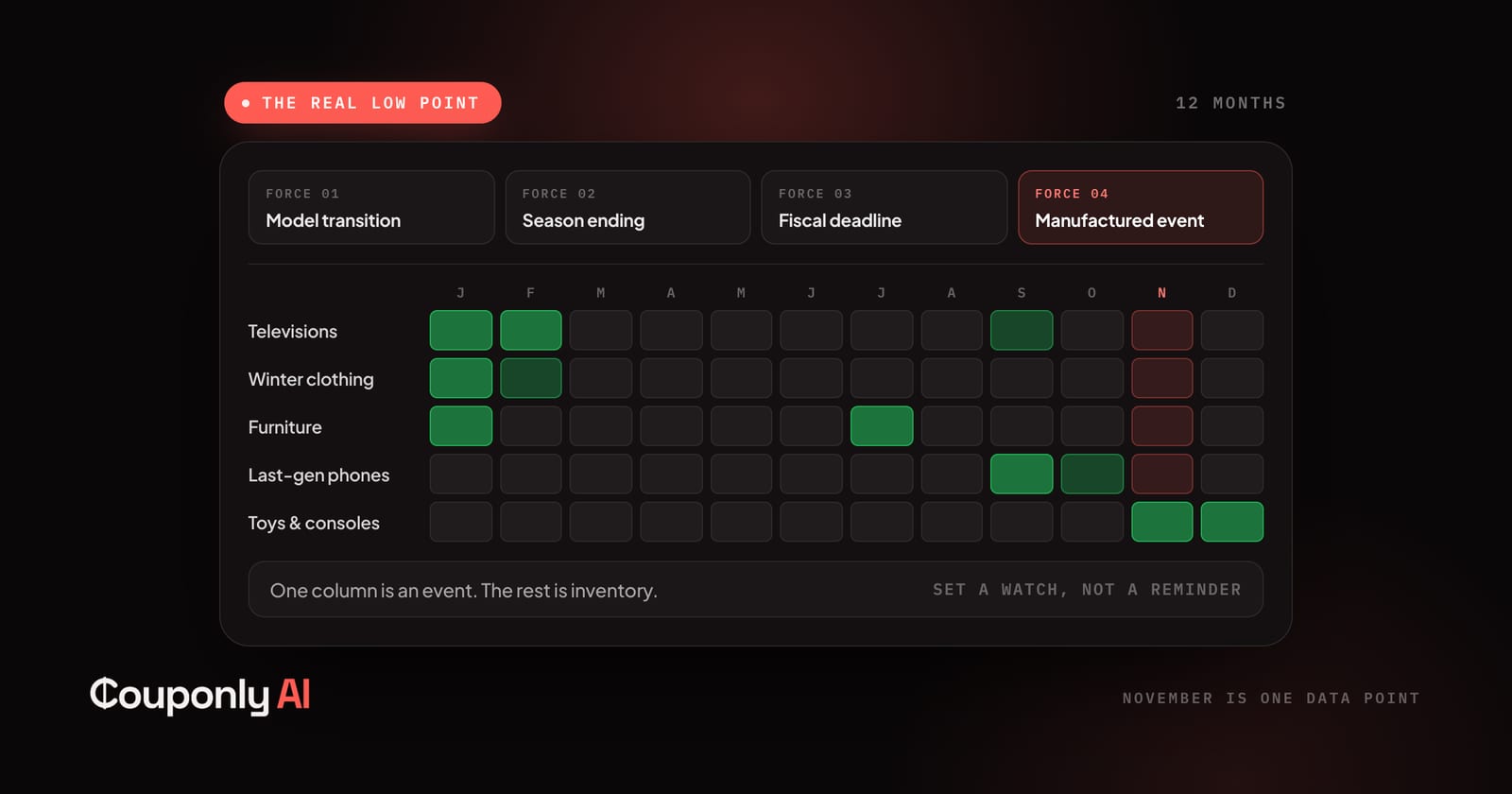
Sale events are marketing. Product cycles and season endings are structural — and they're what actually move prices. Here's the calendar month by month.
Couponly Editorial